Imagine a bustling e-commerce platform running seamlessly on a Kubernetes cluster. Suddenly, security telemetry flags an underlying operating system vulnerability on one of the cluster’s underlying servers. The system requires immediate patching, OS upgrades, or hardware maintenance.
Here is the critical dilemma: What happens if Kubernetes continues placing brand-new application Pods on that compromised or retiring server while you are trying to fix it?
If you don't actively tell the cluster to stop scheduling work there, new workloads will continue landing on a dying or unstable environment, inviting unexpected deployment failures and frustrating user downtime. This is where Kubernetes cordoning comes into play.
Cordoning is a foundational pillar of safe, resilient Kubernetes node management. In this comprehensive guide, we will break down what cordoning is, how it works under the hood, and why it is indispensable for modern DevOps best practices.
What Is a Kubernetes Node?
Before diving deep into cordoning, it helps to ground ourselves in basic Kubernetes architecture.
Think of a Kubernetes cluster as a powerful factory orchestra managed by a control center (the Control Plane). To run applications, the cluster relies on worker machines called Nodes.
- Node = A server or virtual machine (physical or cloud-based) that provides the raw computing power, memory, and networking muscle.
- Pod = The smallest deployable unit in Kubernetes, acting as a lightweight sandbox environment where your application containers (like a Node.js API or a Go microservice) actually live and run.
The cluster's scheduler dynamically assigns Pods to Nodes based on available resources. But when a physical or virtual server needs to be taken offline, you need a precise way to control this scheduling engine.
What Is Cordoning in Kubernetes?
What is Kubernetes cordoning?
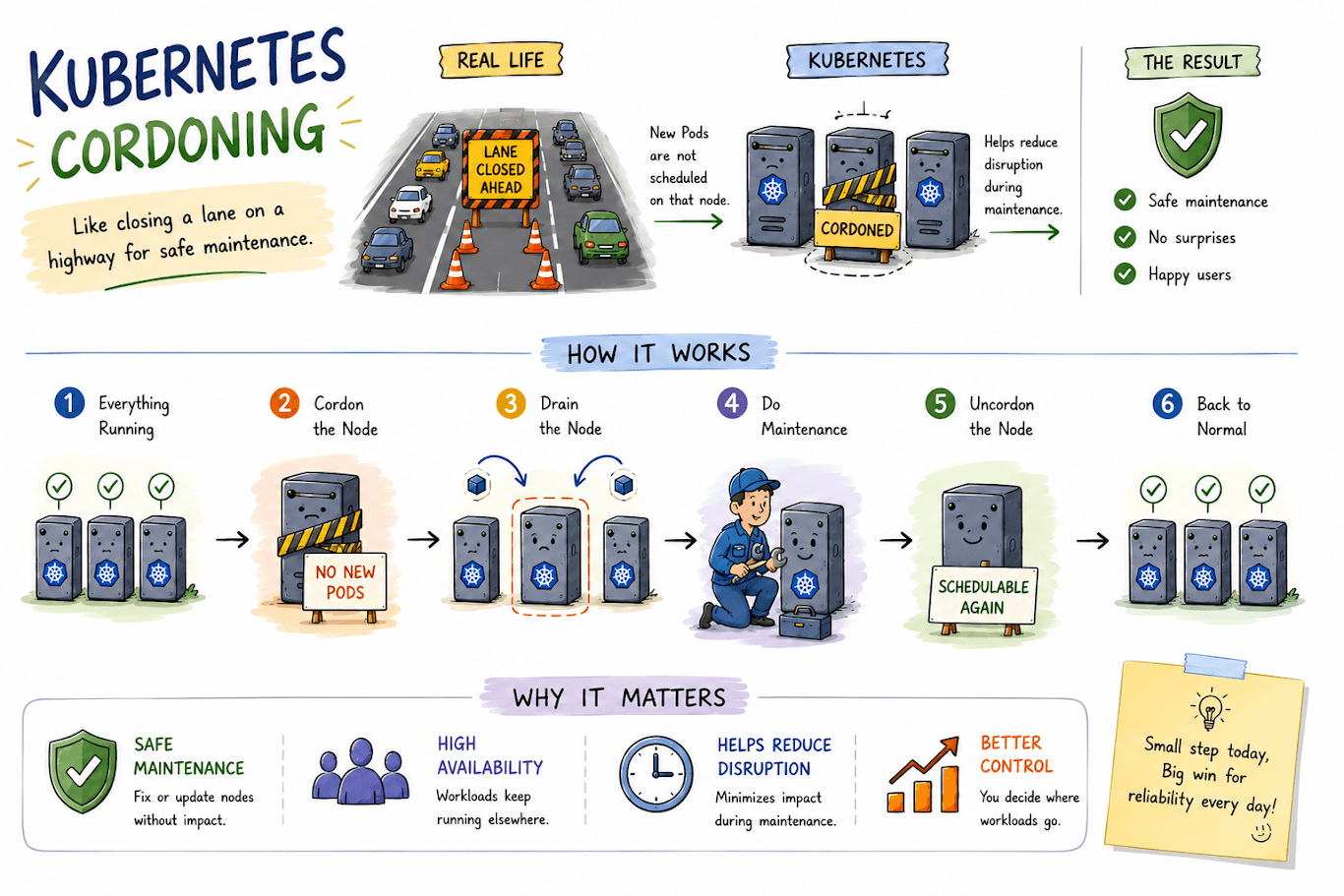
Cordoning marks a Kubernetes Node as unschedulable, which prevents new Pods from being placed on it while existing Pods continue running undisturbed.
When you execute a cordon command, you are telling the Kubernetes scheduler: "Do not deploy any new workloads onto this specific machine, but leave everything currently running alone."
To execute this, DevOps engineers use the kubectl CLI tool:
Bash
kubectl cordon worker-node-1
Once this command runs successfully, the status of worker-node-1 changes inside the cluster control plane. If you inspect the node using kubectl get nodes, you will see a status flag update to Ready,SchedulingDisabled.
How Does Kubernetes Cordon Work?
To visualize how scheduling changes, look at the transition:
- Before Cordoning:
- Node 1 - Accepts new Pods
- Node 2 - Accepts new Pods
- Node 3 - Accepts new Pods
- After Cordoning Node 2 (kubectl cordon node-2):
- Node 1 - Accepts new Pods
- Node 2 - Blocked (No new Pods permitted)
- Node 3 - Accepts new Pods
Crucially, cordon does not automatically terminate or move existing workloads. The apps running on Node 2 keep serving live user requests. Cordon simply builds a virtual velvet rope around the node, blocking new arrivals from stepping foot inside.
Why Is Cordoning Important in DevOps?
In enterprise environments, infrastructure is constantly changing. Cordoning protects that volatility through several critical mechanisms:
1. Safe Node Maintenance
Clusters require regular OS updates, security patches, kernel upgrades, and hardware swaps. Cordoning isolates the target machine so you can perform intrusive updates without the scheduler throwing random workloads onto it mid-patch.
2. Preventing New Workloads During Failures
If a cloud virtual machine begins exhibiting hardware degradation, cordoning ensures that scaling events or rolling deployments do not route vulnerable traffic or fresh containers onto a failing instance.
3. Reducing Operational Risk
By taking a deliberate, step-by-step approach to modifying cluster infrastructure, engineering teams drastically minimize accidental configuration disruptions and human error during high-stress maintenance windows.
4. Supporting High Availability
While cordoning alone does not guarantee high availability, it works in tandem with cluster replicas, scheduling constraints, and PodDisruptionBudgets (PDBs) to ensure applications remain accessible across healthy nodes while one node undergoes service.
Cordon vs. Drain vs. Uncordon
A common point of confusion for beginners involves differentiating between cluster maintenance commands. Here is how they compare:
| Command | Action Performed | What Happens to Existing Pods? |
| kubectl cordon | Marks node as unschedulable | Remains running untouched |
| kubectl drain | Evicts workloads & blocks scheduling | Gracefully terminated & rescheduled elsewhere |
| kubectl uncordon | Restores node schedulability | None (Opens node for future scheduling) |
Memory Trick:
- Cordon = Stop new work.
- Drain = Move existing work.
- Uncordon = Allow work again.
Typical Kubernetes Node Maintenance Workflow
In real-world Kubernetes cluster management, engineers rarely use cordon in isolation. It forms a vital link in a sequential lifecycle:

- Check Node: Review cluster utilization and verify cluster health using kubectl get nodes.
- Cordon Node: Prevent any new scheduling streams.
- Drain Node: Safely evict active pods so they reschedule onto healthy nodes.
- Perform Maintenance: Execute patches, cloud upgrades, or hardware swaps.
- Verify Node: Ensure the node returns to a healthy, ready state.
- Uncordon Node: Re-open the node to the scheduler pool.
Real-World DevOps Example
Consider a fintech or e-commerce enterprise running a core microservices infrastructure on a 3-node Kubernetes cluster.
A critical Linux kernel security vulnerability drops, requiring an immediate node reboot across the cluster. If an engineer SSHs directly into a server and reboots it without preparation, any Pods residing on that server crash instantly, causing dropped customer transactions and error pages.
The Right Way Using Cordoning:
- The engineer cordons node-alpha (kubectl cordon node-alpha), preventing new pods from spawning there.
- The engineer drains the node (kubectl drain node-alpha --ignore-daemonsets), gracefully shifting current pods to node-beta and node-gamma.
- The node is safely patched and rebooted.
- Once verified, the engineer uncordons the node (kubectl uncordon node-alpha), safely restoring full cluster capacity.
When Should You Cordon a Kubernetes Node?
DevOps teams implement cordoning during numerous operational scenarios, including:
- Planned operating system patching and kernel updates.
- Kubernetes version control upgrades (e.g., upgrading from v1.29 to v1.30).
- Deep troubleshooting of misbehaving node-level networking or storage drivers.
- Cloud provider instance retirement or underlying hypervisor migration.
- Hardware replacement (such as failing RAM or dying SSD arrays).
Important Things to Check Before Draining a Node
Because cordoning naturally precedes draining, an expert engineer always reviews structural safeguards before expelling pods:
- PodDisruptionBudgets (PDBs): Ensure PDBs are configured so that draining doesn't take down too many replicas simultaneously, which would cause an application outage.
- Replica Counts: Verify that Deployments have multiple replicas (replicas: 3+) so workloads can easily shift elsewhere.
- DaemonSets: Keep in mind that DaemonSets (like logging or monitoring agents) bypass standard drain evictions unless explicitly handled.
- Local Storage: Pods utilizing hostPath or local persistent volumes cannot easily be rescheduled without manual data migration considerations.
Common Mistakes When Using Cordon
Avoid these pitfalls frequently encountered in production operations:
- Thinking Cordon Deletes Pods: Cordon leaves active workloads running. If you need pods moved, you must follow up with a drain command.
- Ignoring Cluster Capacity: Draining a node without checking if the remaining nodes have enough CPU and memory headroom can cause pods to get stuck in a Pending state.
- Forgetting to Uncordon: Leaving a node permanently cordoned creates an unbalanced cluster, wasting computing resources and overloading other nodes.
- Skipping PDBs: Forcing evictions without PodDisruptionBudgets can break High Availability guarantees during peak traffic hours.
Best Practices for Kubernetes Node Maintenance
- Always verify node health and cluster capacity before initiating maintenance workflows.
- Automate repetitive patching tasks using GitOps pipelines and operator patterns where possible.
- Maintain comprehensive monitoring and observability dashboards to catch scheduling bottlenecks instantly.
- Document maintenance playbooks to streamline incident response times for junior engineers.
How Cordoning Fits Into a Modern DevOps Strategy
Cordoning is not a standalone tool; it is a critical instrument within a broad cloud-native framework encompassing Infrastructure as Code (IaC), continuous integration, continuous delivery (CI/CD), and automated resilience engineering. By establishing smooth, automated node-lifecycle workflows, enterprises minimize mean-time-to-recovery (MTTR) and protect continuous business operations from avoidable human error.
How InheritX Helps Businesses Build Reliable DevOps Infrastructure
Scaling cloud-native architectures requires rigorous engineering precision. At InheritX we help businesses design, automate, and optimize robust Kubernetes infrastructure, cloud environments, and modern DevOps pipelines. Whether you are migrating monolithic legacy architectures to microservices, implementing Zero-Downtime deployment strategies, or securing multi-cloud platforms across AWS and Google Cloud, our certified engineering teams deliver scalable, resilient solutions tailored to your business goals.
Looking to improve your Kubernetes, cloud, or DevOps infrastructure? Connect with the InheritX team to discuss your requirements.
Frequently Asked Questions
What does cordon mean in Kubernetes?
Cordoning marks a specific Kubernetes Node as unschedulable, meaning the cluster scheduler will refuse to place any new Pods on that node.
Does cordon delete existing Pods?
No. Cordoning leaves all existing running workloads completely untouched. It only restricts future Pod scheduling.
What is the difference between cordon and drain?
Cordon stops new workloads from landing on a node, whereas drain goes a step further by safely evicting existing pods and moving them to alternative nodes.
Why do DevOps engineers cordon nodes?
DevOps engineers cordon nodes to safely perform operating system patches, Kubernetes version upgrades, hardware maintenance, or troubleshooting without risking new traffic reaching an unstable machine.
What happens after a node is cordoned?
The node status changes to SchedulingDisabled, and all newly created or rescheduled pods bypass this node entirely.
How do you uncordon a Kubernetes node?
You restore a node back to full operational scheduling by running kubectl uncordon <node-name>.
Can a cordoned node still run existing pods?
Yes. Existing applications running on the cordoned node continue execution and serve user traffic normally until they are manually deleted, evicted, or the node is shut down.
Is cordoning enough to prevent application downtime?
No. Cordoning must be paired with proper workload replication, PodDisruptionBudgets, and overall high-availability cluster architecture to ensure uninterrupted zero-downtime operations.